Download Itunes 10.2 2 for Mac Updated
Download Itunes 10.2 2 for Mac
Apple has released iOS 10.2 for iPhone, iPad, and iPod bear on. iOS 10.ii includes new wallpapers, a new Tv app, some small-scale adjustments to the Music app Shuffle and Repeat push button, a couple of new screen effects for imessage. Over 100 new emojis icons are also included, ranging from a cowboy, a cucumber, an astronaut, someone using a Mac, guerrilla, owl, avocado, a selfie, a handshake, and more than.
iOS x.2 also includes various bug fixes and other improvements to the mobile operating system.
Download & Update to iOS 10.two
The easiest way to install and update iOS 10.2 on an iPhone or iPad is by using the Over-the-Air update machinery:
- Back up the iPhone, iPad, or iPod touch to iTunes and/or iCloud
- Open the "Settings" app and go to "General" and then to "Software Update"
- Choose "Download and Install" when iOS 10.two appears on screen
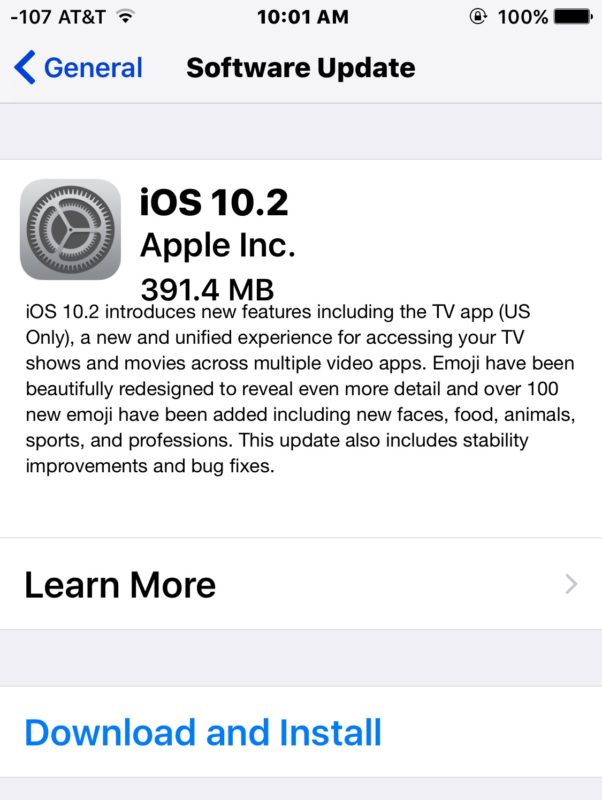
iOS 10.two will download and automatically install onto the device.
Another option is to update and install iOS ten.2 through iTunes past connecting a device to a computer with a modern version of iTunes.
iOS 10.2 IPSW Download Links
Users can also choose to download iOS ten.2 IPSW firmware files directly from Apple. Using IPSW to update iOS is not particularly difficult but it is generally advanced and not necessary for the vast majority of users.
- iPhone seven
- iPhone 7 Plus
- iPhone 6s
- iPhone 6s Plus
- iPhone six
- iPhone 6 Plus
- iPhone SE
- iPhone 5s
- iPhone v
- iPhone 5c
- 12.ix inch iPad Pro
- 9.7 inch iPad Pro
- iPad Air 2
- iPad Air
- iPad iv
- iPad Mini 4
- iPad Mini 3
- iPad Mini 2
- iPod Touch (6th generation)
Troubleshooting iOS 10.two Update
If iOS 10.2 is not showing upwardly for you in Software Update, yous may need to delete whatever existing quondam iOS software updates first that may be stored on the device. Later on that, reboot the iPhone or iPad. You can larn how to restart an iPhone or iPad, or reboot an iPhone 7 here, which is a slightly different process. Upon rebooting the iOS ten.ii update should appear as expected.
If you lot're looking to find the new Emoji icons in iOS 10.2 simply load the Emoji keyboard as usual and scan around, they are intermixed with existing emojis in iOS.

iOS ten.2 Release Notes
Release notes for iOS 10.two are equally follows:
iOS 10.two introduces new features including the Television receiver app (Usa Merely), a new and unified experience for accessing your TV shows and movies across multiple video apps. Emoji have been beautifully redesigned to reveal even more detail and over 100 new emoji have been added including new faces, nutrient, animals, sports, and professions. This update also includes stability improvements and problems fixes.
TV
▪ Use Up Next to meet the movies and shows you're currently watching and pick up where you left off
▪ Get recommendations for new movies and Television set shows in Picket Now
▪ Discover new apps and the latest iTunes releases in the Store
▪ Access the Library for your iTunes purchases and rentals
Emoji
▪ Beautifully redesigned emoji that reveal even more detail
▪ Over 100 new emoji including new faces, food, animals, sports, and professionsPhotos
▪ Improves stabilization and delivers faster frame charge per unit for Live Photos
▪ Improves accurateness of groupings of like photos of the same person in the People anthology
▪ Fixes an issue where Memories might generate a memory from photos of screenshots, whiteboards or receipts
▪ Fixes an result where the camera would stay zoomed in afterwards switching dorsum from the Camera Roll on iPhone 7 Plus
▪ Boosted support for RAW digital cameras
Letters
▪ Adds new love and celebration full screen furnishings in Messages
▪ Fixes an event that sometimes prevented the keyboard from displaying in MessagesMusic
▪ Swipe up the At present Playing screen to more easily access Shuffle, Repeat and Upwards Next
▪ Choose how to sort Playlists, Albums, and Songs in Library
News
▪ Stories you've saved for later on now appear the new Saved section
▪ The all-time paid stories from channels you subscribe to will now appear in a dedicated section in For You
▪ It's now easier than always to become to the side by side story, just swipe left or tap Next Story while readingPostal service
▪ Fixes an issue that caused the Move sheet to persist after filing a Mail message
▪ Addresses an issue with long press activating re-create and paste in Mail
▪ Fixes an result in which the incorrect message would be selected subsequently deleting a Mail conversationAccessibility
▪ Adds BraillePen14 back up to VoiceOver
▪ Fixes an effect where the braille table could switch unexpectedly with VoiceOver
▪ Fixes an issue where sometimes Siri enhanced voices were unavailable to VoiceOver
▪ Fixes an consequence where VoiceOver users could not re-order items in lists
▪ Fixes an issue where Switch Control was sometimes unable to delete VoicemailsOther improvements and fixes
▪ Adds notification back up for HomeKit accessories including window coverings, occupancy, motility, door/window, smoke, carbon monoxide, and water leak sensors
▪ Adds notification back up for HomeKit accessories when software updates are bachelor to HomeKit accessories
▪ Improves Bluetooth functioning and connectivity with 3rd party accessories
▪ Fixes an issue that could crusade FaceTime participants to appear out of focus
▪ Fixes an issue that could cause FaceTime calls to appear with incorrect aspect ratio and orientation
▪ Fixes an issue that prevented some Visual Voicemail from completing playback
▪ Fixes a Safari Reader issue that could cause manufactures to open up as empty pages
▪ Fixes an issue that could cause Safari to quit unexpectedly afterward marking an item as read in Reading Listing
Separately, tvOS 10.1 is also available for Apple TV users, and watchOS 3.1.1 is available for Apple Lookout.
Download Itunes 10.2 2 for Mac
Posted by: jenningsbeely1987.blogspot.com

Post a Comment for "Download Itunes 10.2 2 for Mac Updated"